
Day 4 - The Agent Landscape: Frameworks, Runtimes, Tools and Builders
Week 1 · Day 4 · Lecture 17. Day 4 is where you find out what agents really are in practice: tool calling, agent loops and autonomy, built by hand. First, a step back to map the agent landscape, because the field is overhyped, still immature, and full of overlapping products and confusing terminology.
Where we are
Over the last three days you learned that orchestrating LLMs is nothing fancy: you call an LLM, take its output and use it as input to the next call. Today the same treatment goes to tool calling and agent loops. The instructor warns that some of the secret sauce behind agentic AI looks a bit simplistic once revealed, and that is part of the lesson.
The agent landscape: four kinds of offering
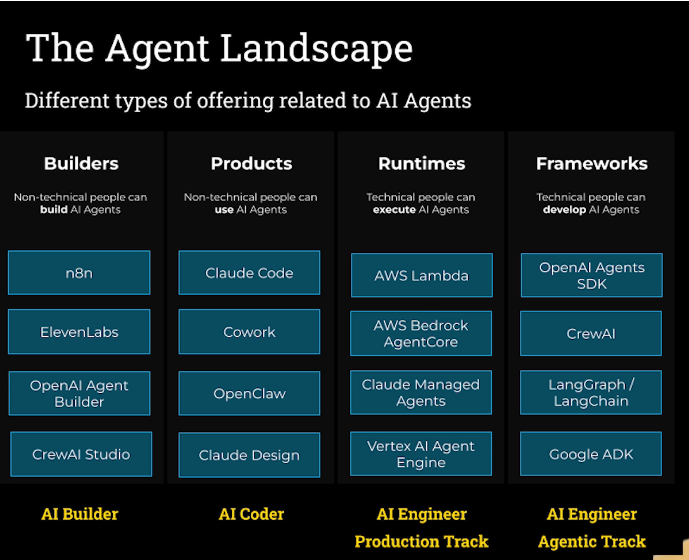
This is the instructor's own way of carving things up as of now; you may split it differently, and the Udemy Q&A is the place to say so.
| Category | Who it is for | Examples | Course track |
|---|---|---|---|
| Builders (AI builders) | Non-technical (and technical) people who build agents, typically drag and drop | n8n, ElevenLabs (voice-focused), OpenAI Agent Builder (similar to n8n, fewer integrations), CrewAI Studio | AI Builder |
| Products (agent products) | Non-technical people who use agents | Claude Code, Cowork, OpenClaw, Claude Design | AI Coder |
| Runtimes | Technical people who execute agents, which can run and interact with each other on the platform | AWS Lambda (general cloud), AWS Bedrock AgentCore, Claude Managed Agents, Vertex AI Agent Engine | AI Engineer Production Track |
| Frameworks | Technical people who develop agents | OpenAI Agents SDK, CrewAI, LangGraph / LangChain, Google ADK | AI Engineer Agentic Track (this course) |
- Builders let end users assemble agent solutions. CrewAI Studio is the builder front end for the CrewAI framework you will meet in week 3.
- Products are platforms that use agents for you. Claude Code runs an agent loop you chat with; Cowork deals with receipts or produces PowerPoint and Excel files; OpenClaw is an always-on local assistant with lots of connectivity (the instructor's version watches his stock portfolio and plays upbeat music on Spotify when it is doing well); Claude Design is like an agent version of Figma. There is some overlap with builders (OpenClaw is arguably a bit of both), but most things sit squarely in one camp.
- Runtimes are platforms that execute agents. Agents are just code calling LLMs, so anywhere you can deploy cloud software, such as AWS Lambda, works. Specialised runtimes like Bedrock AgentCore, Claude Managed Agents and Vertex AI Agent Engine are designed for running agents that operate in the wild and interact with each other. Many have long, tortuous names.
- Frameworks are the libraries technical people use to build agents quickly. That is what this track is about.
Peeling back agent frameworks
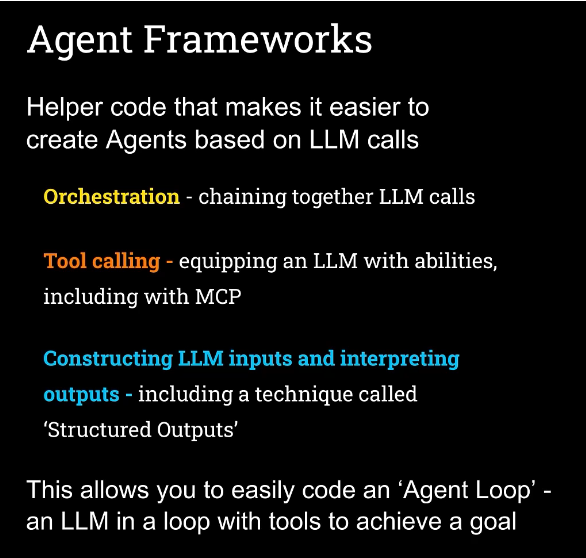
An agent framework is simply a library of utilities and helper code that makes it easier to build an agent from multiple LLM calls. It takes care of repetitive work you would otherwise redo again and again, which is why frameworks are called abstraction layers. They simplify, nothing more. They typically handle three things:
- Orchestration - chaining LLM calls together and gluing them. You saw this can be done with some nice, lightweight code.
- Tool calling - giving an LLM new abilities, such as looking up a stock price as we did in n8n. Doing this manually is janky (some JSON, some prompt text, some way to read results back); the framework wraps it up. It usually includes MCP, a simple way to use tools somebody else wrote: write your own tools and add them to your LLM, or use someone else's through MCP. Week 6 covers MCP in depth, and this is the first sprinkle of it.
- Constructing LLM inputs and interpreting outputs - assembling the best input for an LLM and best interpreting what comes back. One technique here is Structured Outputs: instead of plain text, the LLM yields a Python object you can act on. How? It is a bit of trickery: the LLM is prompted to produce JSON in its text, and ordinary code turns that JSON into a Python object. The framework handles the prompting for the JSON format and the conversion for you, though it is also easy to do with the OpenAI client library directly.
Together these make it easy to build an agent loop: an LLM running in a loop with tools to achieve a goal, which is the working definition of an AI agent from earlier in the course.
The frameworks this course covers
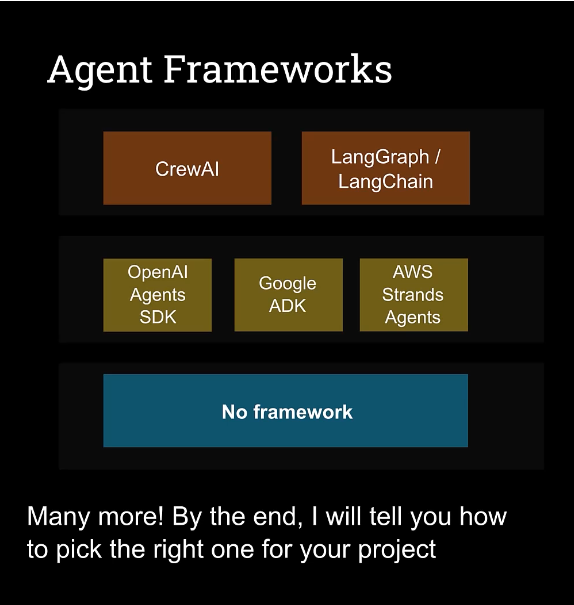
The slide stacks the frameworks from most to least opinionated, ending with no framework at all.
- Lightweight: OpenAI Agents SDK (the instructor's favourite, because he prefers lightweight frameworks and the control they give; that does not mean it will be yours), Google ADK (very similar and also lightweight), and AWS Strands Agents (a newer entrant, popular with AWS teams, also lightweight and nice).
- Opinionated: these prescribe a way of working, so you succeed by embracing it. The upside is moving quickly and building powerful systems. The downside is fighting the framework when you want something different - a double-edged sword.
- CrewAI is opinionated and also "batteries included": lots of functionality baked in, so very little work gets powerful things running. Ferociously popular.
- LangGraph (with its close cousin LangChain) is heavily used in enterprise. It is bulletproof and puts structure around agentic AI that tames it and makes it repeatable. Very different from CrewAI despite the shared "opinionated" label.
The plan: OpenAI Agents SDK in week 2, CrewAI in week 3, LangGraph in week 4, Google ADK, Strands Agents and others in week 5, with about five and a half weeks to go.
The missing category: no framework
Frameworks are utilities for speed, not a necessity. Building an agent does not require one. In Anthropic's seminal blog post on building effective agents (mentioned earlier), they recommend starting without a framework: start simple, because it is a great way to learn how things really work. That is exactly why week 1 uses none. You will hook LLMs to tools, put them in a loop, and hand-roll your own agent loop so you get a concrete sense of what "an LLM call with tools in a loop to achieve a goal" means without a framework in the way. It is a bit janky, and that is the point: once you have done it, you have done the rite of passage and can use frameworks galore.
Which framework should I pick?
The final lecture of the course gives a summary of which framework suits which project. The spoiler: it is not that important. Engineers tend to over-focus on architecture and infrastructure decisions, but the frameworks are different ways of doing much the same thing. What matters more is your team's skills, which framework appeals to you, and where you want to sit between opinionated and flexible. After doing a couple, you kind of know them all. Each week still teaches something new, both a new framework and new techniques, so do not skip a week because you never plan to use that framework.
What you should now understand
- The four offerings: builders (build), products (use), runtimes (execute), frameworks (develop), and which course track each aligns with.
- Agent frameworks are abstraction layers over orchestration, tool calling (including MCP) and structured inputs and outputs, which together make an agent loop easy.
- Structured Outputs is JSON that ordinary code turns into a Python object, not magic.
- Lightweight versus opinionated is a trade-off between control and speed.
- You do not need a framework, and this week builds the agent loop by hand.
Resource links
- Anthropic - "Building Effective Agents" (recommends starting without a framework)
- OpenAI Agents SDK documentation
- CrewAI documentation
- LangGraph documentation
- Google Agent Development Kit (ADK) documentation
- AWS Strands Agents
- Model Context Protocol (MCP)
- This lecture on Udemy
Next
Next up: how tool calling really works, the truth behind AI agent autonomy.